What is Virtual Guitarist AMBER
Virtual Guitarist AMBER is your melodic partner. AMBER brings a cozy and gleaming plucking to your creation. It is packed with over 50 Styles, more than 600 Phrases, various effects, and sound manipulation controls…After experimenting with and evaluating numerous pairings of premium guitars and microphones, we discovered an audio delight: a boutique American vintage dreadnought and a renowned German vintage large diaphragm microphone. To enhance sonic versatility, we’ve also recorded the guitar pickup.
Virtual Guitarist AMBER creates vibrant chords and motifs spanning various genres and includes over 600 distinctive Phrases categorized into 57 Styles. AMBER allows management of auditory elements that produce a genuine experience, including playing position and fret sounds. The distinct Shimmer control enhances high frequencies while reducing the mid range, giving your mix that special glossy finish.
For more similar content, feel free to visit our Audioz tools
- Arturia Pitch SHIFTER 910 Full Version WiN-MAC Multilenguaje
- KORG Filter Ark Full v1.0.4 [WiN] R2R Multilenguaje
Key Features
- Select from more than 50 designs and 600 classic acoustic strumming phrases.
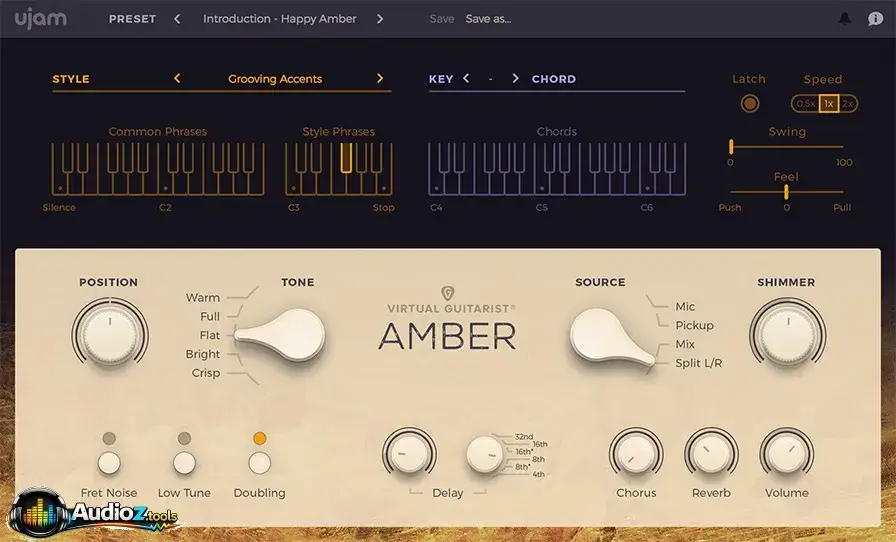
- Modify your guitar’s reaction for enhanced realism by using the Position control to tweak your hand placement during strumming.
- The five-way tone switch allows you to change your guitar’s tone from rich to bright and clear.
- Virtual Guitarist AMBER combines and selects your recording source from a microphone to a pickup with the Source control.
- The distinctive Shimmer control actively enhances high frequencies while reducing mids for a pristine sound.
- Onboard features allow you to tailor the sound of your acoustic guitar.
- Temporal and spatial effects, like Delay and Reverb, contribute to creating atmosphere and ambiance.
- The one-button Duplication feature allows you to expand the stereo image of your audio.
- The one-button Fret Noise feature enhances the authenticity of your sound.
- The sole option for a top-tier studio guitarist. Enter the groove of your piece by tweaking the Swing and Feel settings for a smooth rise and fall.
- The Low Tune switch allows you to decrease the pitch of your tones on the guitar, making them more compatible with the composition or melody.
System Requirements
- Mac: OS X 10.11 / macOS 10.12 or later – 64-bit
- Windows: Windows 8 or later – 64-bit
Format:
- Mac: VST, AU, and AAX
- Windows: VST and AAX
- RAM: 4 GB
- Disk Space: 2.4 GB
Supported OS
- Windows: Windows 10 or later (64-bit)
- Mac: macOS 10.15 (Catalina) or later
- Supports VST2, VST3, AU, and AAX formats
How to Use
- Set up the Virtual Guitarist AMBER through the UJAM App.
- Launch your DAW and insert VG AMBER 2 onto an instrument track.
- Employ MIDI notes to activate guitar phrases and techniques.
- Modify tone, amplifier settings, effects, and performance controls.
- Adjust strumming patterns, chords, and dynamics as required
Pros & Cons
Pros:
- User-friendly interface for novices
- Authentic acoustic guitar tones
- Integrated effects and amplifier controls
- Ideal for fast music composition
Cons:
- Restricted profound editing in comparison to actual guitar performance
- Needs MIDI input for complete control.
- Not suitable for intricate custom guitar solos
FAQs
- Is Virtual Guitarist AMBER an actual guitar recorder?
No, it’s a plugin for a virtual acoustic guitar instrument.
- Is it possible to use it without a MIDI keyboard?
Indeed, you can create MIDI notes within your DAW.
- Is it compatible with FL Studio and Ableton?
Indeed, it is compatible with prominent DAWs that utilize VST, AU, or AAX formats.
- Is it suitable for novices?
Indeed, it’s made for straightforward chord and strumming management.
- Does it have integrated effects?
Indeed, it features amp simulation and studio effects